Plugin Development Guide
az-scout supports plugins — pip-installable Python packages that extend the application with custom API routes, MCP tools, UI tabs, static assets, and AI chat modes.
How it works
- A plugin registers an
az_scout.pluginsentry point in itspyproject.toml. - At startup, az-scout discovers all installed plugins via
importlib.metadata.entry_points. - Each plugin object must satisfy the
AzScoutPluginprotocol. - Routes, tools, tabs, and chat modes are wired automatically — no configuration needed.
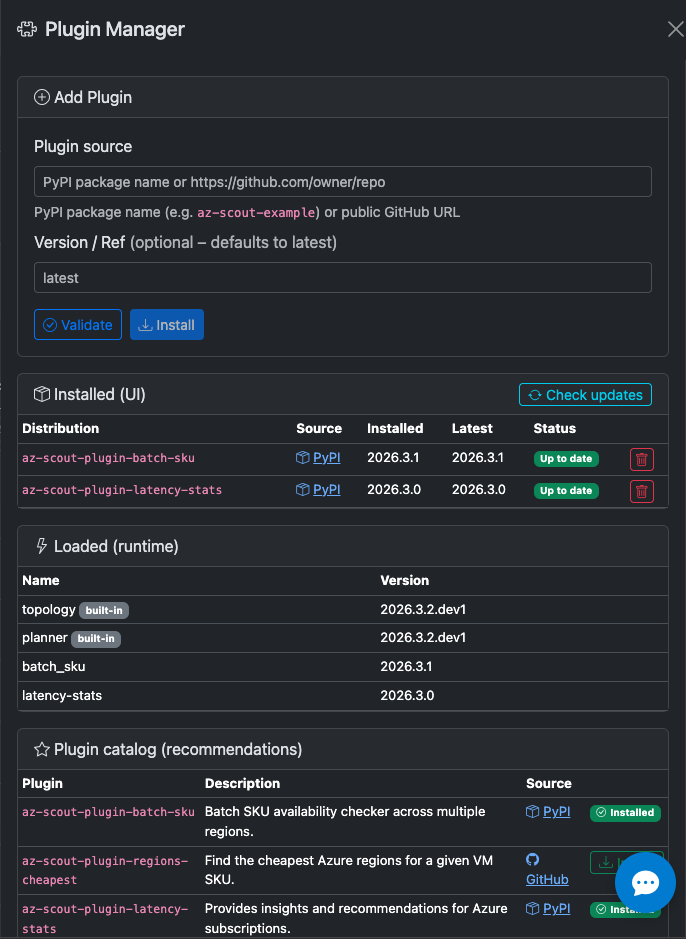
Plugin manager
The plugin manager UI shows all discovered plugins, both built-in and external. You can install new plugins without leaving the app
Quick start
# Copy the scaffold
cp -r docs/plugin-scaffold az-scout-myplugin
cd az-scout-myplugin

# Edit pyproject.toml (name, entry point)
# Implement your plugin in src/az_scout_myplugin/__init__.py

# Install in dev mode alongside az-scout
uv pip install -e .

# Restart az-scout — your plugin is active
az-scout
Plugin protocol
Every plugin must expose an object with these attributes:
from az_scout.plugin_api import AzScoutPlugin, TabDefinition, ChatMode

class MyPlugin:
    name = "my-plugin"    # unique identifier
    version = "0.1.0"

    def get_router(self) -> APIRouter | None: ...
    def get_mcp_tools(self) -> list[Callable] | None: ...
    def get_static_dir(self) -> Path | None: ...
    def get_tabs(self) -> list[TabDefinition] | None: ...
    def get_chat_modes(self) -> list[ChatMode] | None: ...

plugin = MyPlugin()  # module-level instance
All methods are optional — return None to skip a layer.
Extension points
| Layer | Method | What it does |
|---|---|---|
| API routes | get_router() |
Returns a FastAPI APIRouter, mounted at /plugins/{name}/ |
| MCP tools | get_mcp_tools() |
List of functions registered as MCP tools on the server |
| UI tabs | get_tabs() |
TabDefinition list — rendered as Bootstrap tabs in the main UI |
| Static assets | get_static_dir() |
Path to a directory, served at /plugins/{name}/static/ |
| Chat modes | get_chat_modes() |
ChatMode list — added to the chat panel mode toggle |
TabDefinition
@dataclass
class TabDefinition:
    id: str                       # e.g. "cost-analysis"
    label: str                    # e.g. "Cost Analysis"
    icon: str                     # Bootstrap icon class, e.g. "bi bi-cash-coin"
    js_entry: str                 # relative path to JS file in static dir
    css_entry: str | None = None  # optional CSS file, auto-loaded in <head>
ChatMode
@dataclass
class ChatMode:
    id: str              # e.g. "cost-advisor"
    label: str           # e.g. "Cost Advisor"
    system_prompt: str   # system prompt sent to the LLM
    welcome_message: str # markdown shown when the mode is activated
Entry point registration
In your plugin's pyproject.toml:
The plugin object at module level must satisfy AzScoutPlugin.
UI integration
- Plugin tabs appear after the built-in tabs (AZ Topology, Deployment Planner).
- Plugin JS files are loaded after
app.js— they can access all existing globals. - Plugin JS should target
#plugin-tab-{id}as the container for its content. - URL hash
#{tab-id}activates the plugin tab — deep-linking works automatically.
Frontend globals
Plugin scripts run after app.js and can use these globals:
| Global | Type | Description |
|---|---|---|
apiFetch(url) |
function |
GET helper with JSON parsing + error handling |
apiPost(url, body) |
function |
POST helper |
tenantQS(prefix) |
function |
Returns ?tenantId=… or "" for the selected tenant |
subscriptions |
Array |
[{id, name}] — subscriptions for the current tenant |
regions |
Array |
[{name, displayName}] — AZ-enabled regions |
Reacting to context changes
// Listen for tenant changes
document.getElementById("tenant-select")
.addEventListener("change", () => { /* reload plugin data */ });
// Region is a hidden input — observe with MutationObserver
const regionEl = document.getElementById("region-select");
let lastRegion = regionEl.value;
new MutationObserver(() => {
if (regionEl.value !== lastRegion) {
lastRegion = regionEl.value;
// reload plugin data
}
}).observe(regionEl, { attributes: true, attributeFilter: ["value"] });
HTML fragments pattern
Keep markup in .html files under static/html/ and fetch at runtime:
async function initTab() {
const pane = document.getElementById("plugin-tab-example");
const resp = await fetch("/plugins/example/static/html/example-tab.html");
pane.innerHTML = await resp.text();
// bind event listeners after injection
}
MCP tools
MCP tool functions are plain Python functions with type annotations and docstrings:
def my_tool(region: str, subscription_id: str) -> dict[str, object]:
"""Get something useful for a region and subscription.
Returns a dict with the results.
"""
from az_scout.azure_api import some_function
return some_function(region, subscription_id)
The docstring is the tool description shown to LLMs — keep it concise.
Plugin pyproject.toml template
[build-system]
requires = ["hatchling"]
build-backend = "hatchling.build"
[project]
name = "az-scout-myplugin"
version = "0.1.0"
requires-python = ">=3.11"
dependencies = ["az-scout", "fastapi"]
[project.entry-points."az_scout.plugins"]
my_plugin = "az_scout_myplugin:plugin"
[tool.hatch.build.targets.wheel]
packages = ["src/az_scout_myplugin"]
[tool.ruff]
line-length = 100
target-version = "py311"
[tool.ruff.lint]
select = ["E", "F", "I", "W", "UP", "B", "SIM"]
[tool.mypy]
python_version = "3.11"
strict = true
Testing
Plugins can be tested independently. The main app provides:
discover_plugins()— can be mocked to inject test plugins.register_plugins(app, mcp_server)— accepts any FastAPI app and MCP server.
from az_scout.plugins import register_plugins
from az_scout.plugin_api import AzScoutPlugin

def test_my_plugin() -> None:
    plugin = MyPlugin()
    assert isinstance(plugin, AzScoutPlugin)
Known Plugins
| Plugin | Description |
|---|---|
| az-scout-plugin-batch-sku | Azure Batch SKU availability — discover and compare Batch-supported VM SKUs per region |
| az-scout-plugin-latency-stats | Inter-region latency statistics — D3.js graph visualisation of pairwise RTT between Azure regions |
| az-scout-plugin-strategy-advisor | (WIP) Multi-region capacity strategy recommendation engine |
See the scaffold reference for the complete starter template.